Check the Impact Summary table on your dashboard to see your all-time hours. Follow the steps under “Calculating Your Total Volunteer Hours” to make sure the totals are correct.
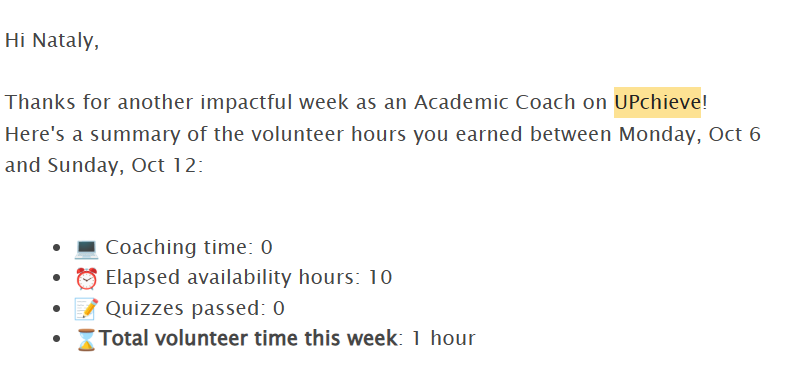
See the email we send every Monday with your hours from the previous week (Monday 12 AM -Sunday 11:59 pm UTC time zone).
It looks like this:
Please note:
Your weekly hour summary doesn’t include referral hours. You’ll get a separate email for those.
You’ll get a weekly summary email if you either:
tutored or passed a quiz, or
logged into the platform (even if you only had availability time)
If you didn’t tutor, pass a quiz, or log in, you won’t get an email—but your elapsed availability hours will still show in your Impact Summary.
Great news—we’ve just launched a new tool that emails volunteers a day-by-day breakdown of their hours
Go to this page and scroll to “Get Your Volunteer Hours Summary.” Fill out the form and wait for an email.
If you need a day-by-day breakdown of your volunteer hours, you can request it using the first form on this page where it says “Get Your Volunteer Hours Summary.” We’ll email you a daily breakdown in minutes.
If you’d like us to automatically show your total cumulative hours for a specific date range, broken down by category (tutoring, quizzes, referrals, elapsed availability), fill out this short Google Form and we’ll email them to you.
If you want to manually calculate your all-time hours, use the Impact Summary on your Dashboardand add the following:
Coaching Activity: Hours all time – Total time you’ve spent tutoring
Certifications: 1 hour per quiz passed (including the UPchieve 101 quiz). Multiply your total certifications by 1
Note: We don’t store the dates you passed quizzes. If you need those, email [email protected] and we can help.
Hours elapsed: Hours from your weekly availability that have “elapsed.”
To calculate, divide by 10.
Example: 10 scheduled hours = 1 elapsed hour the following Monday
Referral hours: Earn 12 minutes for each referral who signs up using your custom link, or 1 hour for every 5 referrals.
Additional Hours Not Listed in Impact Summary:
Track these separately:
Coach meetings: Earn 1 hour per meeting attended.
Held on the 1st Wednesday of each month at 9 PM ET
You’ll need to track attendance month since we verify it against attendance records
Approved projects: Any time spent working on UPchieve-approved projects.
NTHS hours: time spent working on UPchieve NTHS chapter activities (such as hosting office hours/meetings, preparing meeting decks, and social media promotion)
⚠Note: Letters, signature requests, and service awards won’t be processed if you haven’t completed onboarding or if you are banned from our platform.
Get your volunteer hour verification letter by email in just minutes—just fill out our short request form. 🎉
📌 Note:
Hours are automatically calculated based on the selected date range—no need to calculate them in advance.
You must be fully onboarded and have completed at least one tutoring session to get a letter.
Letters aren’t generated for elapsed availability hours only.
Special hours (NTHS, projects, webinars) or custom letters may take up to 8 business days.
NTHS hours need prior approval from the NTHS team. Please email [email protected] to request approval for X hours—they’ll CC [email protected] so we’re looped in. Once support confirms, you can submit the form.
If your letter shows fewer hours than expected, it’s likely because of the date range you selected. Not sure when you started volunteering? Use the first form on this page to find your start date before requesting your signed letter.
Click here to see a sample letter.
Y
es! UPchieve launched the UPchieve Service Award 🏅to recognize and celebrate the incredible commitment of our volunteer coaches! 🎉Check out this article for more information
To have your school’s volunteer form signed, submit a request here: https://upchieve.org/verify-volunteer-hours where it says “We can sign your form”. We will send you a signed form within 8 business days.
Just be sure any verification emails are sent to [email protected], and include the date range for the hours you completed (you can add it in the description or notes if there’s no option to select it). For example: “I completed 10 volunteer hours between May 1, 2026 and May 30, 2026”
Name: Nataly Miranda
Title: Senior Program Manager
Email: [email protected]
Company name: UPchieve
Location: Remote/ HQ located at 150 Court Street, Suite 2, Brooklyn, NY 11201
EIN: 82-4456163
Please refer to our Volunteer Hour Tracking Guide for clarification on how UPchieve calculates hours.
We kindly ask for your patience and that you wait 8 business days before following up about your form.
Due to our large volunteer base and limited resources, we can’t provide personalized feedback or job references.
Quiz pass dates aren’t visible on the platform, unfortunately. If you need those dates, just email [email protected] and we can help
Search your email for your UPchieve welcome email and note the date the email was sent or just email [email protected] and we can help
Yes! Volunteering at UPchieve can qualify you for the National Service Honor, a program run by Helper Helper that recognizes verified volunteer hours.
Unlike our in-house service awards, UPchieve does not issue or cover the cost of this award. If you’d like to receive it, you’ll need to apply and purchase it individually.
How it works:
Check the required volunteer hours for your age group on the National Service Honor website.
Request a verification letter from UPchieve here and attach it to your NSH application.
Apply through the National Service Honor website.
When applying, enter:
Primary organization where hours were tracked or performed: UPchieve
Primary organization contact name: Nataly Miranda
Primary organization contact email: [email protected]
Primary organization contact phone: 732-440-9269
Helper Helper will then contact UPchieve to verify your hours.
Once confirmed, you can complete payment and receive your award (certificate + pin).
