Our staff regularly visits partner schools to introduce students to UPchieve and show them how to use the platform for the first time. As part of the presentation, students are asked to request a session so they can experience what it’s like to connect with a coach.
You may be the volunteer who picks up one of these requests! Here’s a helpful guide for navigating these first-time sessions.
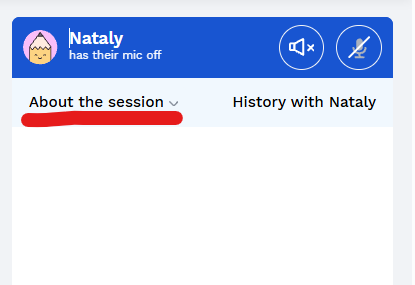
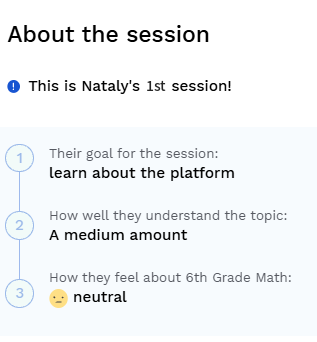
The student may tell you it’s their first time on the platform. You can also check by clicking “About this session” in the upper-left corner of the session chat to see their session count.
That’s completely normal! Don’t panic or end the session right away.
Try:
Validate: “That’s totally okay! A lot of students feel that way when they first show up.”
Get curious: Ask about school, upcoming tests, or anything stressful.
Explore goals: Ask what classes they want to improve in or what they’re thinking about after high school.
Offer suggestions: Show them what UPchieve can help with.
Keep it warm, casual, and human. Use the student's name when you can.
For example:
“Hey Maya! Welcome to UPchieve, I’m really glad you’re here. What’s going on for you today?”
Avoid jumping straight into “What’s your question?” or “What problem are you working on?”
Take the pressure off and stay curious. You can ask about their grade, what school has been like lately, or what they’re looking forward to.
If they’re still unsure, remind them that simply knowing UPchieve is available when they need it is valuable.
Great! Shift from onboarding into helping them take the next step. You can help them explore how UPchieve can support that need.
It depends on the student's grade. For example:
Grades 6–8: Homework, test prep, study skills, math, science, English, history
Grades 9–10: Harder coursework, college prep, reading and writing, extracurriculars
Grades 11–12: College applications, essays, financial aid, scholarships, and choosing majors
Mention features when they’re relevant to the conversation:
Whiteboard: Helpful for working through math
Voice chat: An option if chatting feels slow
Photo upload/screen share: Helpful for working through homework
24/7 availability: Useful for students who study late or have test anxiety
Session history: Lets students return to what they covered
College counseling: Especially relevant for students in grades 11–12
Students choose a subject, describe what they need help with, and get matched with an available coach. They can work together through chat and the shared whiteboard. Afterward, the student rates the session. UPchieve is free and available 24/7.
No. Tutors are matched on demand so students can get help quickly. Every coach is trained.
No. Text is the default, but coaches and students can opt into voice chat if they both agree. There is no video.
Don’t end with “Come back sometime.” Try to get a specific day and time.
For example:
“Would Tuesday or Wednesday work better for you?”
If they aren’t sure, suggest a day:
“No worries! Let’s aim for Tuesday, and if something comes up, that’s okay.”taff
