To ensure the safety of all students on our platform, you’ll need to submit a valid photo ID as proof of identity before you can tutor students on UPchieve.
Your photo ID is used only for volunteer verification and safety screening. This helps us maintain a safe and trusted environment for students and volunteers.
We take your privacy and security seriously.
All volunteer data is encrypted using enterprise-grade technology
Only a limited number of authorized UPchieve employees can access and review IDs
Your personal information is not shared with students, other volunteers, or outside parties
We do not sell your information
Yes. UPchieve stores volunteer IDs in the rare event that we need to investigate a safety-related concern.
After the screening process, access to your ID is restricted to a limited number of authorized UPchieve employees.
Log in to your UPchieve account dashboard
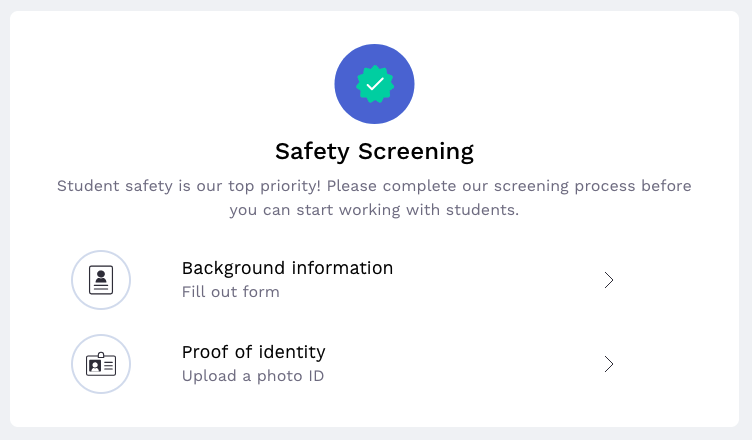
Click on “Proof of Identity” in the “Safety Screening” section of your tasks
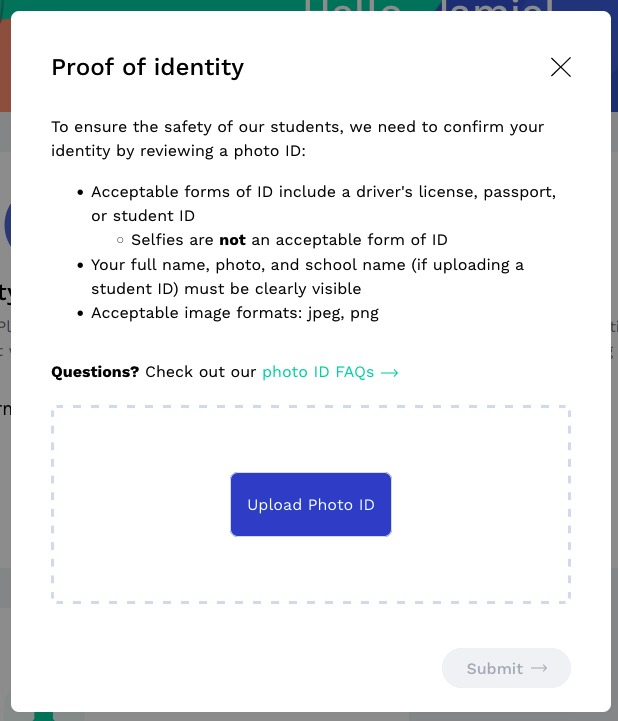
Upload a photo of your government- or school-issued photo ID
Please allow up to 1-2 business days for the UPchieve team to review your photo ID.
You’ll receive an email if your photo ID submission was rejected, and you’ll be able to upload a new ID on your dashboard following the same steps as above.
ID must be government-issued or school-issued (e.g., state ID, driver’s license, passport, school ID)
If submitting a school ID, the school name must be visible
If your school ID shows that you're in 8th grade, but you've recently graduated and haven't received your 9th grade ID yet, please email proof of your 8th grade graduation to [email protected]
The ID must be physical, such as plastic ID card or passport.
Digital School ID Exception and Verification Process
Submitting digital school IDs are allowed if you meet ONE of these requirements:
Your account uses a school email that matches the school name on your digital ID
You contact us at [email protected] to request a verification code, then send that code back from your school email
First and last name on the account must match the ID
The first and last name and photo of the person must be visible
Photo of ID must not be blurry, have glare, or be pixelated
File format must be JPG, JPEG, or PNG, or else we cannot open the file
ID must be in English
We cannot accept:
Selfies
Paper or temporary licenses
Expired IDs
Blurry, pixelated, or glare-covered photos
IDs with missing name or photo
Non-English IDs
Files that are not JPG, JPEG, or PNG
School IDs where the school name is not visible
A volunteer application or photo ID is typically reviewed and approved within 1–2 business days (Monday through Friday). Processing times may be slightly longer during holidays.
Please note you cannot tutor until your ID has been approved, but you can pass quizzes and review training material.
It means an UPchieve team member hasn’t reviewed your ID yet. Please wait at least 2 business days before following up with us.
We’ll need to reject your first submission so you can upload a new photo. Please wait for the rejection email before trying again.
Common reasons for rejection
The name on your account doesn’t match the ID
Your first and last name or your face were not visible
The ID is not government-issued or school-issued (e.g., driver’s license, passport, school ID)
If submitting a school ID, the school name must be visible
Selfies are not acceptable forms of photo ID
Photo is blurry, has glare, or is low quality
The file format is incorrect (JPG, JPEG, or PNG) and we couldn't open the file
The ID is not in English
The ID is on paper, digital, or a temporary license
We understand that some countries, such as Nigeria, Ghana, and Kenya, provide residents with digital IDs. However, UPchieve doesn’t currently have the tools needed to verify the authenticity of digital IDs, so for security screening, we require a physical government-issued ID, such as a plastic ID card or passport.
The ID says you’re in 8th grade. You must be in 9th grade or higher to volunteer at UPchieve. If you've recently graduated from 8th grade and don't have your new school ID yet, email proof of graduation to [email protected]
To proceed with volunteer onboarding, please upload a new photo as soon as possible.
We normally only accept photos of physical school IDs. However, we can approve digital school IDs if you meet one of these requirements:
Your account uses a school email that matches the school name on your digital ID
You contact us at [email protected] to request a verification code, then send that code back from your school email
